Christmas AI video ideas: your room, your cat or your family?
Choose a Santa camera scene, a singing-cat greeting or a Christmas dance from the photos you have, with practical ideas for captions and sharing.
Choose a Christmas AI video by the photo you have: use a room photo for a Santa gift visit, a cat portrait for a singing-cat greeting, or separate person photos for a holiday dance. Select the matching version before uploading. A selfie does not replace the room in the Santa scene, and a single group upload does not fill several dancer slots.
A useful Christmas AI video idea also starts with the person you want to send it to. A familiar room, pet or group of people gives the greeting a reason to belong in that person's messages. These are different projects, and choosing between them is more useful than searching for one generator that promises everything.
The three options below are existing templates with examples you can watch before generating. They are ideas for a personal greeting or a seasonal social post, not predictions about what will go viral. Match the scene to your recipient and keep the message specific.
Turn your own living room into a Santa camera scene
The Santa Caught on Camera template uses a room photo to make a fictional gift-delivery scene. This works when the space is recognizable: the family tree, a familiar sofa or the corner where presents usually appear. The room is the personal detail, so a stock image of a grand Christmas interior would miss much of the point.
Choose a wider photograph with the floor, tree and a clear route into the scene visible. A tight crop of decorations gives Santa very little space to stand or move. Remove clutter you do not want emphasized and avoid a camera angle that cuts off the floor immediately beneath the tree.
Select Living room for the indoor gift delivery. The same template also offers a separate two-person Porch prank with different photo requirements; neither version is a live Santa call. The Santa trend guide explains that distinction. Watching the matching preview is a better way to choose than assuming every “Santa cam” result includes the same action.
A caption such as “The living-room camera finally caught something useful” gives the scene a playful setup. Call it an AI Christmas edit when sharing it; do not present a generated camera-style clip as an authentic recording. The familiar room is enough to make it fun without inventing a real visit.
Let the cat take over the Christmas greeting
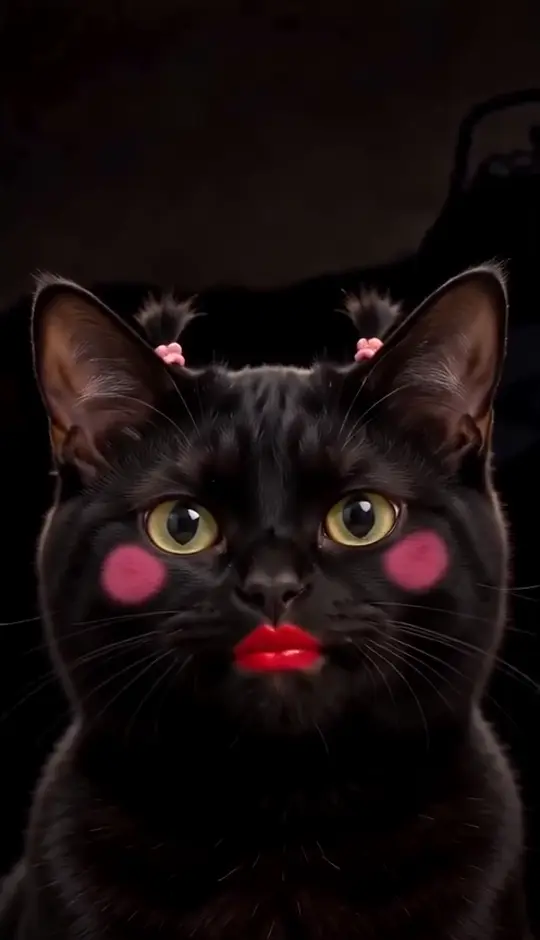
The Christmas Singing Cat template is a close-up with exaggerated lipstick, rosy cheeks, mouth movements and small head rocks. It suits the friend or relative who already knows your cat’s personality. A serious-looking pet suddenly performing a holiday solo needs very little explanation.
Upload one clear cat portrait with the muzzle and ears visible. You do not need a Christmas costume, tree or hat in the photograph. The template supplies its comic styling. The reviewed example uses a fictional black cat; the linked TikTok reference and the generated result are shown separately.
This is a fixed short performance with a fixed soundtrack excerpt, not a custom song service. It cannot promise to sing everyone’s name or deliver a newly written verse. Put those details in the message accompanying the clip. “A seasonal announcement from the head of the household” can do more for a familiar cat than a generic list of festive wishes.
If you prefer a birthday or gotcha-day greeting, use the birthday singing cat instead. It has a cupcake scene and a different fixed performance. Choosing a scene by occasion is more dependable than trying to turn one template into every possible celebration.
Make a Christmas dance with one, two or three people
The OG Christmas Dance template offers a solo living room, a snowy-street duo and a studio trio. The routine includes bouncing steps, finger points and an overhead finish. It works for a greeting built around people: a couple, siblings or friends whose faces are the main reason the clip will be shared.
Choose the version before preparing your photos. Use one identifiable person in each slot, rather than repeatedly uploading a crowded group shot. Comparable face angles and clear lighting help the inputs read as one cast. You do not need to photograph anyone dancing or standing in snow.
The two-person photo guide covers role assignment and identity checks in more detail. For a group dance, watch each performer after turns and overlaps. A good opening frame does not guarantee that every face remains consistent through the final gesture.
Give the routine an ordinary holiday situation. “The decorating committee has arrived” works for a group; “Us after agreeing to keep Christmas simple” works for a duo. These lines are easier to recognize than a caption describing each dance step, and they leave room for the actual greeting underneath.
Choose the idea that fits your photos
Use a room scene when the home itself is the memory. Use the cat close-up when the recipient loves the pet. Use a human dance when several people are the subject of the greeting. This choice prevents a common mismatch: uploading a selfie to a room-based Santa tool and expecting yourself to become Santa.
You can also decide by what you are comfortable generating. A room offers spatial detail, a cat close-up concentrates attention on the muzzle, and a group dance asks the model to maintain several identities in motion. Each has different weak points. Compare the existing examples against those details rather than judging only their festive mood.
What do the existing Christmas samples actually show?
The living-room Santa example shows a fixed view of a tree and fireplace while Santa approaches the tree and crouches beside it with a present. The Christmas cat example shows a black cat in close-up with red lips, pink cheeks and changing mouth shapes. The OG dance examples show one person beside a tree, two people on a snowy street and three people in a studio. These are different scenes you can inspect before choosing an input.
Our snowy-street Christmas duo example. The solo and trio previews use different settings.
The samples support a practical choice: make the room the subject of a Santa sighting, the pet the subject of a comic close-up, or the people the subject of a dance. They do not demonstrate perfect furniture preservation, a cat singing a custom dedication or unchanged faces through every group movement. The Santa scene guide and Christmas cat guide give the matching examples and limits in more detail.
Check the final greeting with sound
Before sending it, play the downloaded file from start to finish. Confirm the audio is present and that a last-minute edit has not cut off the ending. If you add text, keep it away from the cat’s face, dancers’ arms or Santa’s path across the room. The action should remain easy to read on a phone.
If you add another song in an editing or posting app, listen for competing tracks. A vocal greeting with a second vocal layered over it can become difficult to follow. Use the platform’s music options according to the permissions available to your account and post; do not assume a soundtrack credit is a universal licence for every use.
A short personal note completes the video. Mention the recipient, the pet’s nickname or the family habit that made you choose the scene. The AI supplies an unusual picture. The reason it belongs in someone’s messages should come from you.