How to make your cat sing happy birthday from a photo
Make a birthday greeting with your own cat, choose a useful photo, understand fixed songs versus custom lip sync, and add a personal message that works.
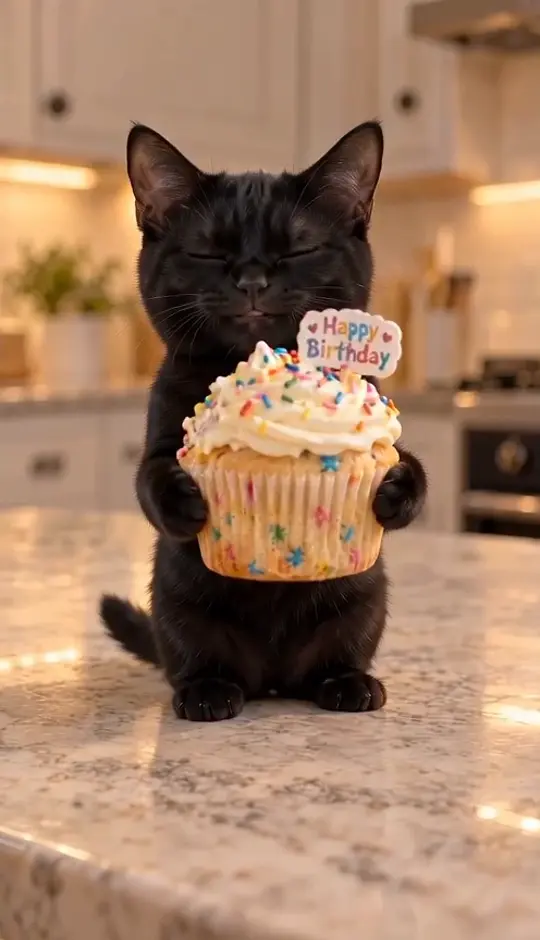
To make your cat sing happy birthday, upload one clear cat photo to the Birthday Singing Cat template and enable its fixed soundtrack. The template creates a short cupcake birthday greeting featuring your cat. The scene and song stay fixed; add the recipient's name in your caption or accompanying message.
A singing-cat birthday video is most fun when the recipient recognizes the cat before the song even starts. You do not need a photograph of your pet wearing a party hat. You need a clear picture of the cat, a birthday scene you actually like and a realistic idea of what the tool will change.
There are two different things people mean when they search for “make my cat sing happy birthday.” One is a ready-made birthday scene with a fixed performance. The other is an audio-driven animation that makes a pet sing chosen words. This template does the first. It does not offer custom names, lyrics or a complete song.
Start with the person receiving the greeting
A birthday video from the cat is a different message from a video for the cat. If you are sending it to a partner, parent or the friend who always cat-sits, the joke is that the pet has taken over the greeting. Use the cat they know. The slightly scruffy photo with the familiar white chin may be a better choice than a flawless picture of a different animal.
For a pet birthday or gotcha day, make the message about the cat’s place in the household. “Another year of supervising dinner” gives a birthday scene a small personal story. You can add the date, age or nickname in the message accompanying the video. None of those details needs to be generated onto a cake to make the greeting meaningful.
Which cat photo should I upload?
For the Birthday Singing Cat template, choose a photo of one cat with a sharp, unobstructed face, visible ears and a clear muzzle. Avoid a bowl, toy or another pet blocking the lower half of the face. Singing motion draws attention to the mouth, so a photograph with the nose pressed against the camera is a less useful starting point than a relaxed portrait.
Even light helps you see the features the model needs to recognize. For a black cat, check that the ears do not disappear into a dark background. For a patterned cat, preserve the markings around the eyes and nose when you crop. You do not need to stage a birthday scene; the template supplies the cupcake and performance.
If the only photo you have is a group of pets, crop to the intended cat first. The current birthday template has one performer. Uploading two cats together is not a shortcut to a duet, and the model may select a different subject from the one you intended.
How to make the birthday clip
Open the birthday template and watch both videos: the source reference and the generated example. The source is linked to @gigglypurrs on TikTok; our separate example uses a fictional black cat. This distinction helps you judge the remake instead of mistaking a reference video for a guaranteed output.
Upload your cat photo, check the settings and displayed cost, and decide whether to enable audio. The template handles the fixed scene, so there is no long prompt to write. After generation, watch the whole result with sound rather than approving it from the poster alone. Check whether the cat remains recognizable as the mouth opens, whether the paws stay connected to the cupcake and whether the final expression still looks coherent.
The photo guides identity, but it does not turn the generation into an exact recording of your pet. Coat details, paws and fine facial features can vary. A higher output resolution changes the image dimensions; it does not automatically repair a changed face or a distorted prop.
What does our generated birthday-cat sample show?
Our example shows a fictional black cat holding a decorated cupcake on a kitchen counter. Across the clip, the cat opens and closes its mouth, makes small head movements and keeps the cupcake in front of its body. This is the generated example to compare with the separate TikTok reference by @gigglypurrs.
Our generated birthday-cat example: a fictional black cat, a fixed cupcake scene and a soundtrack added after video generation.
What this sample demonstrates: a recognizable birthday scene and singing-like facial movement with an added fixed soundtrack. The downloadable MP4 contains an audio track. The example does not establish precise mouth shapes for every sung word, a custom spoken name or the preservation of every marking on a different cat. Watch the mouth and paws through the whole clip before deciding whether this style suits your greeting.
Can the cat sing a name or a different song?
Not in this template. The birthday version uses a fixed short soundtrack excerpt added after the visuals are generated. Its mouth movements suggest singing, but there is no separate word-by-word lip-sync correction pass. The sample shows the practical level of synchronization to expect.
If your requirement is “sing Happy Birthday to Maya in my own voice,” you need a workflow that explicitly accepts custom audio or lyrics and animates the mouth to that recording. Do not assume a tool supports that just because the page title includes “singing cat.” A fixed greeting and a custom singing service solve different problems.
For this version, personalize the dedication outside the performance. Put “Happy birthday, Maya — from the kitchen supervisor” in the message, or add a short text card in an editor after downloading. This is easier to control than asking video generation to spell a name on a tiny moving cake.
Make the message feel like it came from your cat
Write one sentence that only makes sense for this pet and this recipient. A cat that waits beside the food cupboard might send “Thanks for another year of excellent catering.” A cat who ignores everyone except your sister can send “The favourite human has a birthday.” Specific details do more than a pile of festive adjectives.
For a group chat, let the video arrive with a short introduction and the personal note underneath. For a public pet account, keep text away from the face and cupcake. Watch your final edit, particularly if you add a second soundtrack: two vocals playing together can spoil an otherwise simple greeting.
What should I check before I send it?
Play the downloaded MP4 in a normal video player and confirm it contains the sound you selected. A muted website preview is not enough to diagnose a silent export. If the picture is good and only audio is missing, work through the AI video sound checks before paying for another generation.
Then look once more at the details that make the message personal: face, coat pattern and expression. Send the result as a playful AI greeting, not a real recording of the cat singing. For the same pet’s next appearance, the Christmas singing cat offers a different fixed performance, while our cat dance guide explains when a full-body routine makes more sense.